How React Native's old and new architecture work
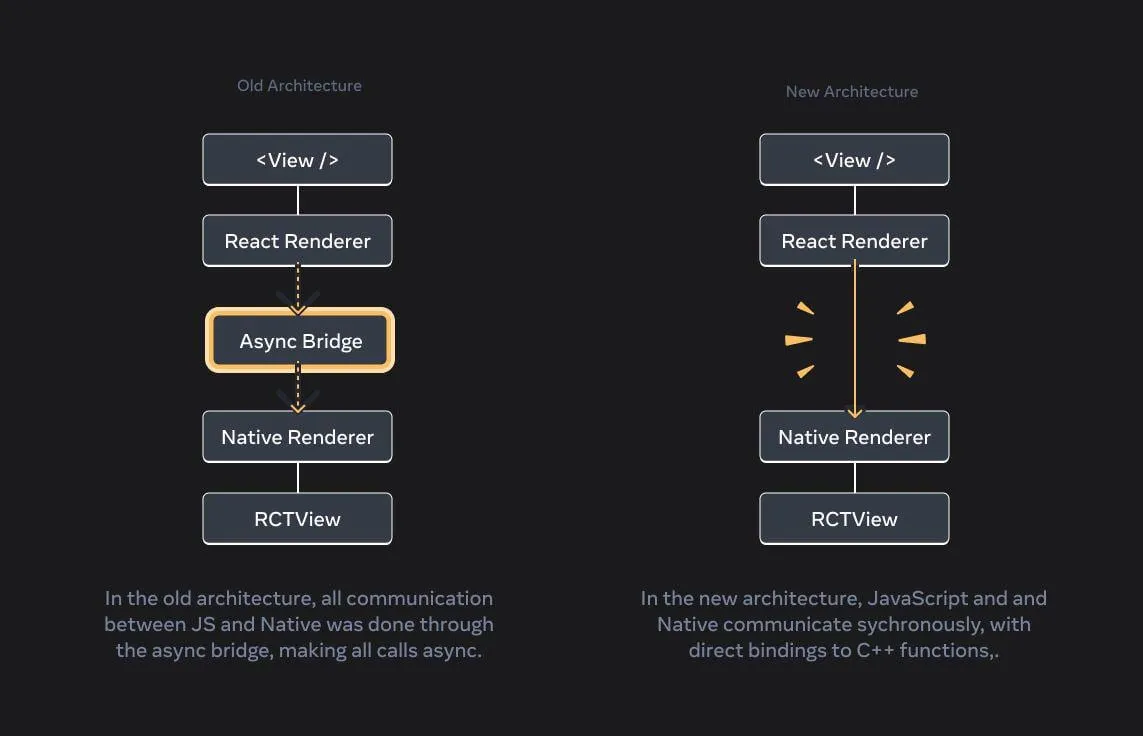
React Native is easiest to understand if you split it into two worlds.
There is the JavaScript world. This is where your React components, state, data fetching, navigation and most of your app logic runs.
Then there is the native world. This is where iOS and Android render views, process gestures, run platform APIs, manage native modules and actually put pixels on the screen.
React Native’s architecture is mostly about how those two worlds talk to each other.
For a long time, that communication happened through the old bridge. The bridge is what made React Native work in the first place, but it also came with some real tradeoffs: async messages, batching, serialization and a fairly hard boundary between JS and native code.
The new architecture changes that boundary. It uses JSI, Fabric, TurboModules and Codegen to make React Native less bridge-orientated and more runtime-orientated. Instead of passing everything through a queue of serialized messages, React Native can expose native capabilities more directly to the JavaScript runtime.
That’s the high level version. The interesting part is why that matters.
The old architecture
In the old architecture, React Native apps were generally talked about in terms of three main threads:
- JS thread: runs your React code and app logic.
- Native / UI thread: renders native views, handles platform UI work and receives input.
- Shadow thread: calculates layout using Yoga before native views are mounted.
The JS thread and native thread could not just share rich objects with each other.
JavaScript is running in a JS engine. Native code is running in Objective-C / Swift on iOS and Java / Kotlin / C++ on Android. These environments have different memory models and different runtime rules. So React Native needed a communication layer between them.
That communication layer was the bridge.
When JS wanted native to do something, it sent a message over the bridge. When native wanted JS to do something, it sent a message back over the bridge.
A button press roughly looked like this:
- The user taps a native view.
- Native receives the touch event.
- Native sends a serialized event over the bridge.
- JS receives the event and runs your
onPress. - React works out what changed.
- JS sends a batch of native UI commands back over the bridge.
- Native applies those commands and updates the screen.
This worked surprisingly well for a lot of apps.
It also explains a lot of the old performance issues.
What the bridge was good at
I don’t think the old bridge was a bad idea. It was a pretty reasonable architecture for what React Native was trying to do at the time.
The bridge gave React Native a clear boundary between JS and native code. It meant the native side did not need to know about every detail of your React app, and the JS side did not need to know about every detail of UIKit or Android Views.
It also kept a lot of work asynchronous.
That matters because blocking the main thread is one of the easiest ways to make a react native app feel cheap. If every JS update synchronously blocked native rendering, React Native would have had a different set of problems.
It gave React Native portability and a predictable message boundary, but that boundary became more painful as apps got larger and React itself moved towards more advanced rendering features.
Where the bridge hurt
The first issue was serialization.
Any data going through the bridge had to be converted into a shape that could cross the boundary, then parsed on the other side. If you’re sending a tiny event, that’s probably fine. If you’re sending large nested objects, arrays, base64 strings or lots of repeated updates, it becomes expensive. As with any language or framework, deserializing and serializing JSON gets expensive
The second issue was copying.
The old bridge could not just hold onto native references in the way you might with direct runtime bindings. Data often had to be copied from one world to another. Copying isn’t always the end of the world, but it adds up when it sits on a hot path.
The third issue was async timing.
The bridge was asynchronous and batched. Batching is good because you don’t want to send thousands of tiny messages one by one. But async batching also means JS cannot always ask native for something and get the answer immediately. Sometimes that is fine. Sometimes, especially around layout, measurement and user input, it is exactly the bit that makes the UI feel late.
The fourth issue was startup.
Old-style native modules were more likely to be initialized up front and accessed through the bridge. If your app had loads of native modules, startup could pay for things the first screen did not need yet.
This is why the old architecture could feel fine in small apps but start getting awkward in larger apps with complex navigation, lists, animations, media, camera, maps or custom native modules.
The frame budget problem
This is also where React Native performance gets misunderstood.
Most phones are trying to render at least 60 frames per second. That gives the app around 16.67ms to do the work needed for each frame.
If the JS thread is blocked, React can’t process events or calculate the next update in time. If the UI thread is blocked, native cannot draw the next frame in time. Either way, the user sees dropped frames and rightly so gets frustrated.
In older React Native apps, JS updates to native-backed views were batched and sent to native at the end of the event loop. If JS was busy running an expensive calculation, rendering a huge component tree or doing work during a navigation transition, those updates could miss the frame deadline and your app freezes for a second or two.
The new architecture reduces some of the communication overhead, but it does not remove the frame budget. You can still block the JS thread. You can still do too much work on the UI thread. You can still build a list item that is far too expensive to mount while scrolling.
So the architecture helps, but you still need to keep your eye on performance and profile performance intensive parts of your app regularly.
The new architecture
The new architecture became the default for new React Native apps in React Native 0.76.
It is made up of a few separate pieces:
- JSI: the low-level JavaScript Interface that lets native C++ code interact with the JS runtime directly.
- Fabric: the new renderer.
- TurboModules: the new native module system.
- Codegen: tooling that generates native bindings from typed JS specs.
React Native’s own new architecture post describes it as a rewrite of the major systems underneath React Native: rendering, JS/native communication and work scheduling across threads.
The important part is this: the new architecture is not just one performance optimization. It changes how React Native is put together.
JSI
JSI stands for JavaScript Interface.
It is a C++ API that lets native code interact directly with the JavaScript runtime. Native code can expose functions and objects to JS without going through the old async bridge.
That means React Native can do things like:
- expose native functions as JS-callable functions
- expose native objects as host objects
- keep references across the JS/native boundary
- avoid JSON-style serialization for everything
- support synchronous calls where the architecture needs them
This is the bit that closes the gap between the JS world and the native world.
On iOS, the C++ layer can sit close to Objective-C++ and Swift integration. On Android, the C++ layer usually talks to Java or Kotlin through JNI.
You still have native platform code. JSI does not magically make iOS and Android the same. What it gives React Native is a common runtime layer that can talk to both platforms without using the old bridge as the main abstraction.
This is also why JSI is not something most app developers need to write by hand.
If you are building normal product features, you will usually use libraries that already expose the native functionality for you. If you are building a low-level library, custom native module, camera pipeline, graphics layer or performance-sensitive integration, then JSI starts to matter directly.
Synchronous does not always mean better
One trap with the new architecture is assuming that synchronous calls are always good.
They’re not.
JSI makes synchronous JS-to-native calls possible, but if you do heavy synchronous work from JS, you can still block the JS thread. If you do heavy synchronous work on the UI thread, you can still drop frames.
The win is not “make everything synchronous”.
The win is that React Native now has a more flexible communication model. Some operations can be synchronous when immediate feedback matters. Other operations can stay async when they should not block rendering.
For example, reading a tiny cached value, checking a feature flag, measuring layout state or calling a lightweight native utility can be synchronous if the result is needed immediately. Heavier work like file IO, networking, database queries, image processing or anything that could stall the UI should still be async.
This is also where Nitro Modules fit into the conversation. Nitro Modules give library authors a more direct, typed way to expose native functionality, so the API can choose the right shape per operation: sync for small latency-sensitive reads, async for expensive native work that should not block JS or rendering.
That’s a much better set of tradeoffs than the old bridge gave us.
TurboModules
TurboModules are the new native module system.
In the old system, native modules were accessed through the bridge and could add startup overhead. TurboModules are designed to be loaded lazily, so a module does not need to do work until JS actually asks for it.
For a small app this might not sound like a big deal.
For a larger app with authentication, analytics, camera, storage, notifications, payments, maps, permissions, audio, video and device APIs, it matters. You don’t want the first screen to pay for every native dependency in the app.
TurboModules also work with Codegen.
Instead of manually keeping a TypeScript type, a native implementation and bridge glue in sync, you define the JS-facing contract and React Native generates the binding layer.
That solves a boring but important problem: type drift.
If the native method expects one shape and your JS types say something else, you might not find out until runtime. Codegen reduces that by making the interface explicit and generated.
Fabric
Fabric is the new renderer.
This is the part that decides how React’s output turns into native views.
In the old architecture, rendering still had to coordinate with native through the bridge-era model. Fabric moves more of the renderer into C++ and lets React talk to it through interfaces exposed by C++ code.
The official render pipeline docs split it into three phases:
- Render
- Commit
- Mount
That sounds abstract, but it maps pretty nicely to what actually happens.
Render
React runs your component logic in JavaScript and creates a React Element Tree.
This is the tree of things like:
<View>
  <Text>Hello</Text>
</View>
That tree only exists in JavaScript. It describes what should appear on screen, but it is not the native view hierarchy yet.
Fabric then creates a React Shadow Tree in C++ for host components like View and Text. Composite components, like your own ProfileCard, do not become native views directly. They reduce down to host components.
This is an important distinction.
Your React component tree and your native view tree are not the same thing. React Native has to reduce React components into host components, calculate layout, diff changes, then apply native mutations.
Commit
Once the Shadow Tree has been created, React Native commits it.
This does a couple of things:
- calculates layout, usually using Yoga
- promotes the new tree as the next tree to mount
- prepares the tree to be turned into native views
Most layout calculation can happen in C++, but some components need platform-specific measurement. Text is a good example because text measurement depends on the host platform.
This is where React Native has to be careful about source of truth. React owns the React tree, but some native state can originate from the host platform. Scroll position is a good example. The user scrolls a native ScrollView, and native needs to update renderer state without going through a normal React render first.
Fabric’s renderer is designed around immutable data structures, so updates create or clone renderer objects rather than mutating shared state in place. That makes it possible to expose thread-safe synchronous APIs without turning the renderer into a race condition factory.
Mount
Mount is where React Native turns the laid-out Shadow Tree into host views.
On iOS, that means UIKit views. On Android, that means Android views.
React Native calculates the difference between the previously rendered tree and the next tree, then applies a list of mutations like:
- create this view
- update these props
- remove this view
- attach this child
The mount work that manipulates host views has to happen on the UI thread.
This is also where view flattening can happen.
View flattening
React code often creates wrapper views just for layout.
For example, you might have a View that only adds margin, another that only handles flex direction, and another that only groups children. In React code, that composition is nice. In native rendering, turning every one of those layout-only nodes into a real native view can be wasteful.
View flattening is an optimization where React Native avoids creating unnecessary host views for layout-only nodes.
That matters because deep native view hierarchies are more expensive to layout, diff, mount and draw.
The nice bit is that Fabric can do this at the renderer level. You can keep writing normal composed React components, and React Native can avoid some of the native cost where the extra nodes do not actually need to exist on screen.
Threading in the new architecture
The threading model also changes in practice.
The React Native docs describe the new renderer as using the UI thread and the JavaScript thread, with renderer internals designed to be thread safe. The common path is still that React render work happens on the JS thread and host view mounting happens on the UI thread.
The difference is that Fabric has more flexibility around scheduling.
High-priority user interactions can interrupt lower-priority render work. Some work can happen synchronously when the UI needs it. C++ renderer state updates can skip the JS render phase when the update originates from native.
This is part of what unlocks better support for modern React features like Suspense, Transitions, automatic batching and useLayoutEffect.
The old bridge made those features awkward because the renderer could not always coordinate JS and native work tightly enough. Fabric gives React Native a renderer that fits React’s newer scheduling model much better.
Codegen
Codegen is not the flashy part, but it is one of the most useful parts.
Old native modules often had a few different contracts that needed to stay in sync:
- the JavaScript or TypeScript API
- the native implementation
- the bridge configuration
- any documentation or wrapper code around it
In a small module, you can keep that in your head.
In a large app, or a library used by lots of apps, this is exactly how weird runtime bugs happen.
With Codegen, you define the typed JS spec and React Native generates the native binding code. That does not remove the need to write native code, but it does remove a lot of handwritten glue.
This is one of those changes that is more about reliability than raw speed. Faster startup is nice, but fewer mismatched native contracts is also a big deal.
What actually improves?
The new architecture improves a few things:
- less serialization and copying across the JS/native boundary
- lazy native module loading
- type-safe native module interfaces
- a renderer that is closer to modern React
- better synchronous layout and measurement paths
- better support for interruptible rendering and high-priority events
- a cleaner foundation for native components and libraries
It also enables newer React behavior that was hard to support properly before.
React Native 0.76’s new architecture work included support for modern React features such as Suspense, Transitions, automatic batching and useLayoutEffect. That does not mean every app gets magically faster just by upgrading. It means the underlying architecture can now support these features properly.
This is the bit I think is easy to miss.
The new architecture is not just about shaving a few milliseconds off a bridge call. It is about making React Native’s internals match where React itself has gone.
What does not automatically improve?
The new architecture does not fix bad app code.
If you render 200 expensive cards on first load, it will still be slow.
If you do a big synchronous calculation on the JS thread during a gesture, it will still jank.
If a list item downloads huge images, performs expensive formatting and mounts a deep tree while scrolling, the new architecture will not save you.
If your app rerenders the whole screen because a context value is recreated every render, Fabric is not going to make that free.
This is why I don’t like architecture discussions that end with “new architecture = fast”. It is more accurate to say “new architecture = less overhead and better foundations”.
You still need to build the screen properly.
React optimizations still matter
React Native performance work usually starts with evidence.
If React DevTools shows one small interaction causing loads of commits, you probably have a React rendering problem.
Some common causes are:
- recreated arrays or objects
- unstable callback props
- context values rebuilt every render
- expensive derived data
- state stored too high in the tree
- list rows rerendering when unrelated state changes
This is where normal React tools still help.
Use useCallback when a callback’s identity matters:
const saveOrder = useCallback(async () => {
  if (onReorder) {
    await onReorder(sections.map(section => section.props.id));
    toggleReordering.off();
  }
}, [onReorder, sections, toggleReordering]);
Use useMemo when a derived value is expensive or when stable identity prevents child work:
const accordion = useMemo(() => {
  return (
    <Accordion {...props} openAll={isReordering ? false : undefined}>
      {sections.map((child, index) => {
        const section = child as ReactElement<
          EditableAccordionSectionProps & DraggableAccordionSectionProps
        >;

        return cloneElement(section, {
          index,
          isReordering,
        });
      })}
    </Accordion>
  );
}, [isReordering, props, sections]);
Use memo for components that render the same output for the same props and are rerendering too often.
But don’t just spray these everywhere.
useMemo, useCallback and memo are useful when they remove measured work. They also add complexity. If a component is cheap and not causing a problem, leave it alone.
Move expensive work away from the JS thread
If you have expensive work happening during an interaction, the first question is:
does this need to run on the JS thread?
Sometimes the answer is yes. A lot of app logic naturally belongs there.
But animations, gesture-driven work, realtime processing and expensive calculations often need a different path. Depending on the feature, that might mean worklets, native code, a background runtime, a native module or moving the work out of the interaction path entirely.
The practical rule is simple:
If the user is touching, scrolling, dragging or navigating, don’t make the JS thread do unrelated expensive work at the same time.
Lists are still where apps get hurt
Lists are one of the easiest places to accidentally burn CPU and memory.
If you render 100 cards with .map, React Native will render 100 cards. On a phone, maybe 5 of them are visible. The rest are still costing memory, layout work and render work.
FlatList improves this by virtualizing the list. It renders a window around the viewport instead of rendering everything.
That’s much better than .map, but it is not free.
If rows are complex, you can still get blank areas, JS thread pressure, memory growth and scroll jank. The list is constantly trying to balance responsiveness, memory usage and fill rate.
The React Native docs have a good FlatList optimization guide, but the main ideas are:
- keep row components light
- use
memofor row components where it helps - avoid anonymous
renderItemfunctions - use stable keys
- tune the render window carefully
- use
getItemLayoutfor fixed-height rows
getItemLayout is especially useful when you know the row height:
getItemLayout={(_, index) => ({
  length: ROW_HEIGHT,
  offset: ROW_HEIGHT * index,
  index,
})}
That lets React Native skip measuring dynamic content.
Use keyExtractor so React can track items consistently:
keyExtractor={item => item.id}Use removeClippedSubviews carefully. It detaches offscreen views from the native hierarchy, which can reduce main thread drawing work, but it can also cause missing content in some layouts.
And keep renderItem stable if the parent rerenders often:
const renderItem = useCallback(({ item }: { item: Coin }) => {
  return <CoinCard coin={item} />;
}, []);
FlatList vs FlashList
FlatList uses virtualization.
That means it keeps a window of items mounted around the visible viewport. Items outside the window can be unmounted. New items are mounted as you scroll.
FlashList uses cell recycling.
Instead of throwing away an old cell and mounting a new one, it keeps a pool of cells and reuses them with different data. This is closer to how native recycler views work.
For simple screens, FlatList is fine.
For large feeds, complex rows or lower-end devices, recycling can make a big difference because mount churn is often the expensive bit.
The important thing is not “always use FlashList”. The important thing is understanding what problem you have.
If profiling shows row rerenders, fix the row.
If profiling shows mounting churn and memory pressure during scroll, recycling is worth looking at.
Profiling the architecture layers
When a React Native screen feels slow, I try to split the problem by layer.
React DevTools answers:
- did this component rerender too often?
- how long did each commit take?
- which component is expensive?
- did one interaction cause a chain of renders?
React Native DevTools is where I would start initially after spotting a performance problem. The profiler and component inspector are usually enough to tell whether React itself is doing too much work.
Xcode Instruments answers iOS-native questions:
- is the main thread blocked?
- is layout expensive?
- are there hangs?
- is memory growing?
- are there suspicious native call stacks?
Android Studio Profiler answers the same kind of questions for Android:
- CPU usage
- memory usage
- allocations
- network
- energy impact
The key is to not rely just on react devtools or native profilers, use both!
Ask one question at a time:
- Is React rendering too much?
- Is the JS thread blocked?
- Is the UI thread blocked?
- Is a native module doing expensive work?
- Is the list mounting too much during scroll?
- Is the app slow only in dev mode?
That last one matters. Development mode adds a lot of overhead. If you’re making performance decisions, profile release builds where possible.
The practical takeaway
The old architecture worked by passing asynchronous serialized messages through the bridge. That gave React Native a clean JS/native boundary, but it also meant copying, serialization, startup overhead and awkward timing around synchronous native work.
The new architecture replaces that model with JSI, Fabric, TurboModules and Codegen.
JSI gives React Native direct runtime bindings. Fabric gives React Native a modern C++ renderer. TurboModules make native modules lazy and typed. Codegen keeps JS and native contracts aligned.
That is a much better foundation.
But it is not a free performance pass.
You still need to keep the JS thread responsive. You still need to avoid unnecessary renders. You still need to treat lists carefully. You still need to profile before and after changes.
The way I think about it is this:
The old architecture made some performance problems harder to avoid.
The new architecture removes a lot of that structural overhead.
But the app is still your app. If you make the screen do too much work, users will still feel it.