Setting up k3s + Immich on a VPS
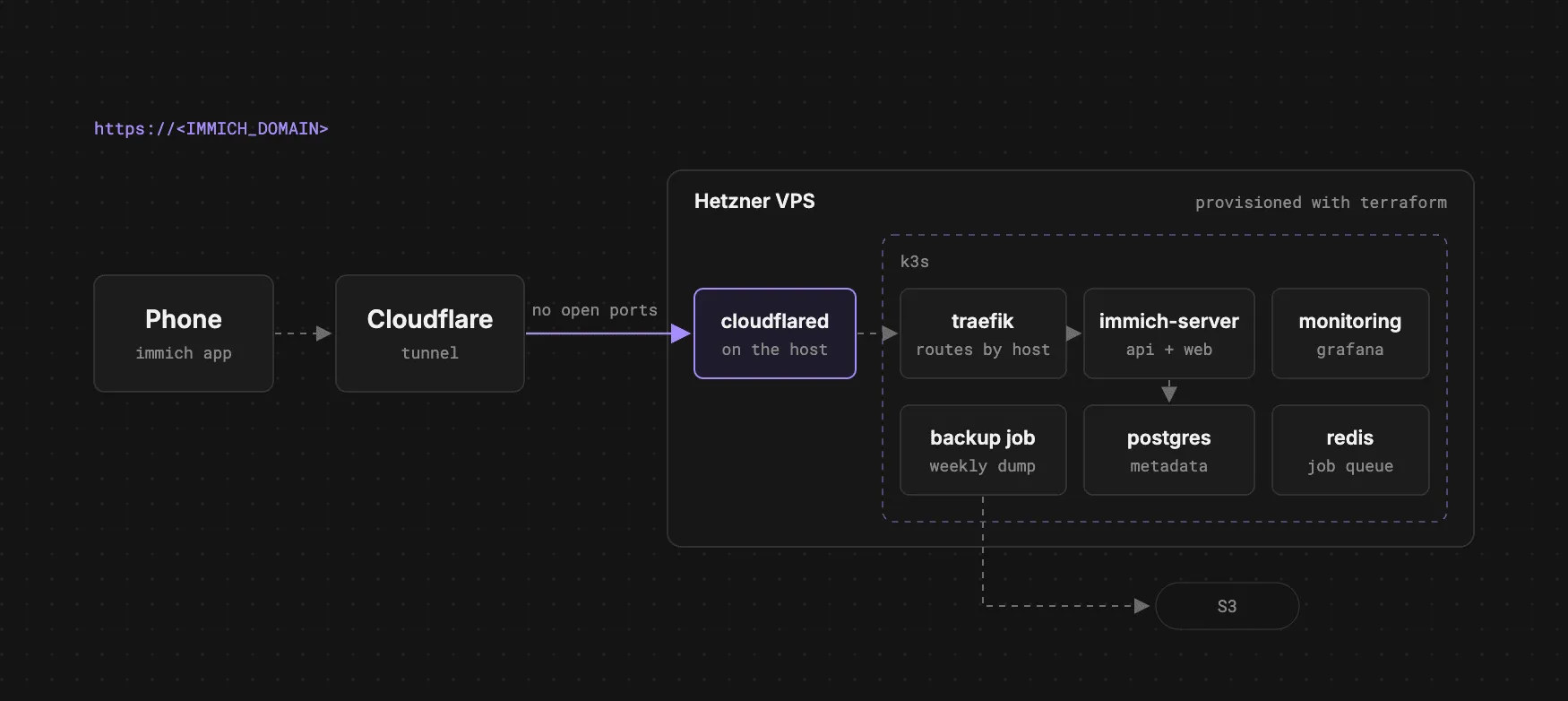
Immich is an open-source, self-hosted photo and video backup stack similar to Google Photos or iCloud, but it runs on your own hardware.
Recently I’ve had issues with Google and Icloud photos. I’ve noticed that they didn’t sync as fast as I’d like, and after a while I’ve quickly been running out of storage. Not wanting to pay for more storage and also wanting to set up a home server, I decided to set up k3s + Immich on a VPS.
I’ve been really happy with Immich. For me it’s ended up being a genuinely better experience than iCloud / Google Photos
The best part is that it doesn’t have to be expensive. I’m running this stack on a small Hetzner server that costs me around €5/month, and it’s been more than enough for k3s, Immich and the monitoring stack
This setup lives in home-server. The goal is pretty simple:
- Immich
- k3s
- monitoring + logs
- Cloudflare Tunnel so I don’t have to expose ports to the internet
- automated backups
This post walks through how the repo is structured and how to set up k3s + Immich on a VPS.
What you get
- Terraform for provisioning the VPS
- Bootstrap script that installs k3s + base tooling
- Deploy scripts that validate env, create secrets, and apply manifests
- Immich deployed into its own namespace with Postgres + Redis
- Cloudflare Tunnel fronting Traefik so everything routes by
Host - Backups: weekly Postgres dumps to S3 and library sync from the Immich sidecar
- Monitoring: Prometheus + Grafana + Alertmanager (+ Loki/Promtail for fail2ban logs)
Prereqs
Locally, you’ll need:
terraformkubectlenvsubst(e.g.gettext-base)
On the server, the scripts handle most of the work.
1) Provision the VPS with Terraform
cd terraform
cp terraform.tfvars.example envs/prod.tfvars
terraform init
terraform plan -var-file=envs/prod.tfvars
terraform apply -var-file=envs/prod.tfvars
Once the VPS is up, SSH in and move onto bootstraping the server
2) Bootstrap: install k3s + tooling
git clone https://github.com/luke-h1/home-server
cd home-server
sudo ./scripts/setup-server.sh
Ensure k3s is installed properly and running:
systemctl status k3s
kubectl get nodes
3) Configure your environment (kubernetes/.env)
cp kubernetes/.env.example kubernetes/.envYou need at least:
- URLs:
IMMICH_DOMAIN,IMMICH_PUBLIC_URL,GRAFANA_DOMAIN,GRAFANA_ROOT_URL,PROMETHEUS_DOMAIN,ALERTS_DOMAIN - Secrets:
IMMICH_DB_PASSWORD,GRAFANA_ADMIN_*,ALERTS_BASIC_AUTH_*,ALERTMANAGER_TELEGRAM_* - S3 backups:
BACKUP_S3_BUCKET,BACKUP_S3_PREFIX,AWS_REGION,AWS_ACCESS_KEY_ID,AWS_SECRET_ACCESS_KEY - Tunnel:
CLOUDFLARE_TUNNEL_TOKEN,CLOUDFLARE_TUNNEL_ORIGIN(defaults to Traefik onhttp://127.0.0.1:80)
Then validate it:
./scripts/k8s.sh env-check4) Create secrets + deploy Immich
The flow I use is:
./scripts/k8s.sh secrets
./scripts/k8s.sh apply immich
this will apply the secrets to the kubernetes cluster and deploy Immich
Or if you want to deploy everything in one go:
./scripts/k8s.sh apply all5) Cloudflare Tunnel
I chose to use Cloudflare Tunnel to front Traefik rather than expose ports to the internet. A lot of services on hetzner have a history of being targetted by IP spoofing attacks, which can lead to your account being suspended/flagged. To avoid the hassle of dealing with this, I opted to use Cloudflare Tunnel in order to not expose any ports to the internet (aside from ssh).
- Cloudflare Zero Trust → Tunnels → create tunnel → copy install token
- Put it into
CLOUDFLARE_TUNNEL_TOKENinkubernetes/.env - Install the tunnel on the server:
sudo ./scripts/cloudflare-tunnel.sh install-tokenThen for each hostname, add a public hostname in the Cloudflare UI pointing to:
http://127.0.0.1:80
Traefik routes based on Host, so the tunnel always points at Traefik and not at random pod ports
Immich mobile is intentionally boring: you mostly just enter your server URL (include :port in the URL when you are not on the default HTTPS port). Match IMMICH_PUBLIC_URL; in this setup that is https://<IMMICH_DOMAIN>.
6) Backups
This setup does two things:
- Weekly Postgres dump to S3 (CronJob)
- Library sync to S3 (from the
immich-serversidecar)
I try to keep this aligned with the 3-2-1 backup idea:
- 3 copies of your data (VPS disk, S3, Google photos)
- 2 different media types (e.g. disk + object storage)
- 1 offsite (Icloud / Google photos)
If you ever need to restore from backups (i.e. on a new server):
./scripts/restore-immich-from-s3.sh7) Monitoring + logs
Monitoring lives in a separate namespace and includes:
- Prometheus
- Grafana
- Alertmanager
- Loki + Promtail (cluster logs)
- blackbox checks
Deploy:
./scripts/k8s.sh apply monitoringUseful Loki queries:
{job="node-authlog"} |= "sshd"
{namespace="immich"} |= "error"
Closing thoughts
If you want to see the exact scripts/manifests, the repo is here: