Tightlog
Tightlog is an offline-first fishing logbook for iOS & Android that helps you capture good memories while fishing.
Tightlog is a fishing logbook for fishermen. I started it because every fishing app I tried either was lacking in terms of UX/UI or they locked basic features behind a paywall. The idea is quite simple: log the fish (species, weight, photo) and the app takes care of the rest. Weather, barometric pressure and its trend, wind, moon phase, tides and live UK river levels are captured automatically, and over a season the app learns from your activity.
Go check it out on the App Store.
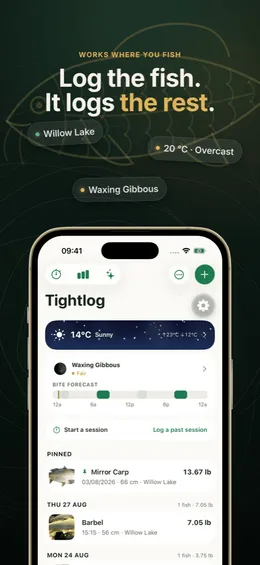
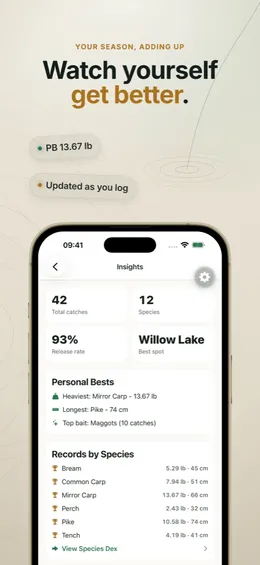
The app is built with React Native, Expo, Expo Router and TypeScript. It’s offline-first: the logbook is a SQLite database on the device. Syncing it to either iCloud or our servers is optional and off until you turn it on. People fish in places with no signal, so everything core has to work without a network.
Weather data is pulled from Open-Meteo, the Environment Agency flood monitoring API and OpenStreetMap when a connection is available. State lives in Legend State, networking goes through TanStack Query, and the UI leans on native SwiftUI/Jetpack Compose components via Expo UI, SF Symbols and Skia where it makes sense.
There’s an AI coach that has read access to your logbook. It gives you a ‘read of the day’ (which time to fish, what the pressure is doing, how today compares with sessions that worked) and you can ask it about rigs, baits and other fishing terminology. The daily read runs on device with Apple Intelligence, and the chat falls back to a Cloudflare Worker proxying Gemini when Apple Intelligence isn’t available.
I also trained a small on-device species classifier (PyTorch, exported to Core ML and TFLite) because Apple’s built-in image classifier has no idea what a lot of fish species are. This helps you if you’re a beginner and aren’t sure what a fish looks like or if you’re experienced and have caught something strange. I built an open source white-labelled version of the training harness we used to train the model that you can checkout here.
The app has several rest APIs that support the app. They are hosted on Cloudflare Workers and communicate internally to each other via RPC. To name a few:
-
a social API for the shared catches feed, friends, groups and private competitions
-
a push API that stores records in Cloudflare D1 for reminders via OneSignal
-
AI worker for MCP and communicating with OpenAI + Gemini (image generation)
Moderation
Because the shared feed is user generated content, we have to have a few layers of moderation to comply with app store rules and also to provide a safe experience for our users.
The fish photos are checked on device via Apple’s sensitive content analyser before it’s uploaded. Once a catch is shared, it goes onto a Cloudflare Queue where the photo and text are ran through OpenAI’s moderation model, falling back to Llama Guard and a vision model on Workers AI if OpenAI is unavailable. If both are down we retry later on.
Anything flagged is taken down and its photo are deleted automatically. Users can report catches and block other anglers and have to accept the feed terms before they can post. Reports and automatic removals land in Discord and Telegram with a link to an internal moderation dashboard behind Cloudflare Access, where I can review reports, restore false positives and track how accurate the classifier is over time.
Closing thoughts
A lot of the work has been around running it as a real product rather than a side project. Infrastructure is managed with Terraform (Cloudflare Access in front of private product dashboards, Resend for support mail, Grafana Cloud for worker metrics), a tail worker forwards exceptions to Discord and Telegram, a public status page, and there are internal dashboards for moderation, push and support mail. The app has separate development, internal, TestFlight, E2E and production variants that can all live on the same device for proper QA, with Sentry and PostHog covering errors, analytics and feature flags.
What I focused on
- Building an offline-first app where the logbook stays on the device by default
- Capturing useful conditions data automatically so logging a catch takes seconds
- Using on-device AI (Apple Intelligence and a custom Core ML model)
- Privacy by default for social features, with location rounding done on the phone
- Running a small production backend on Cloudflare Workers with proper monitoring, alerting and operator tooling
- A fair free tier with no hard paywall at first launch and no ads
What I learned
- How much harder sync, conflict handling and backups get once a user’s data really matters to them and you can’t make breaking schema changes
- Training, exporting and shipping a custom ML model inside a React Native app
- The realities of App Store review, subscriptions and store listing work
- How far Cloudflare Workers, D1 and Turso can go for a solo project
- Operational side (status pages, alerting, moderation, support)